Ok, so lets start by taking a sample question.
Q) Write a program to compute the area of a circle. All the things taken at run time.
Answer:
The meaning of run time is that the values which will be input by the user will be done when the code is running.
The code for the question is as follows:
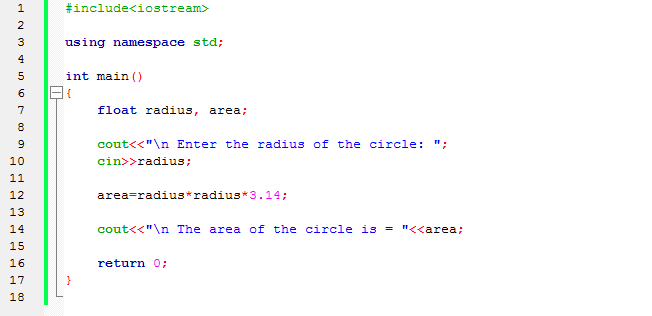
Lets discuss some points here:
1. #include<iostream>
#include is simply used to include the header file in the code. # is also called pre-processor directive. That will be learnt in later parts of the blog. Not a very important term at this stage.
This iostream called the HEADER FILE for the code. Header file are files which contain standard functions required for the working of a code.
Here, this file contains the functions for taking input and showing output. The functions cin and cout (pronounced as cee-in and cee-out) are present in this header file. We will discuss about cin and cout later.
2. using namespace std;
This is included in the code to overcome the difficulty faced by compiler to differentiate two different functions of the same name. It is included in every code as general format.
3. int main()
int is the called the data type. A data type is used to assign a variable or a function the data it will operating. Details about data types are mentioned on the link Data Types.
This main() here tells the compiler that this function is the main function of the code. If this main is missing in the code, then the code will not be compiled. This function contains the main body of the code.
() are known as parenthesis. These parenthesis are used to tell the compiler that it is a function. Example: add and add() are two different things. The first one is a variable while the second one is a function. We will discuss about functions in detail in Functions menu.
4. cout and cin functions
cout function is used to display messages on the screen. The signs << are written after cout. This is known as extraction operator and has to be written after cout for successful working of cout. A very important note – all the messages which you want to display have to be included in double inverted commas ” “. If you want to display a variable, then simply write the name of variable (just like in above code) but do not use inverted commas.
cin function is used to input messages from the user. The signs >> are written after cin . This is known as insertion operator and has to be written compulsorily. If you want to input multiple variables in a single statement, then separate the variable names by a >>.
5. return
return function is used to return the value written after it. Here, 0 (zero) is used because our data type for main function is integer. return function is discussed in detail under Functions menu.
Learning the basics
I hope the above block was useful in giving you an idea how a C++ program looks like and the basic terms associated with the code.
Let us start with learning the basics in detail now.
- Character Set
Character set means the sequence of characters and symbols that a C++ program can understand and accept. C++ supports the following characters:
- Digits (0 to 9)
- Alphabets or letters (A-Z and a-z both)
- Special Characters (Example: * ! @ $ % ^ & _ + = / ? etc.)
- White spaces (also called blank spaces ” “)
2. ASCII Value
ASCII stands for American Standard Code of Information Interchange. Each key on the keyboard (other than function keys and Ctrl, Shift, Pg Down etc) has a unique ID which is represented by a whole number. This includes all the members of character set (except white space). There are a total of 256 ASCII values on a physical keyboard.
ASCII value of some characters are given below:
- Integers (0 to 9): 48 to 57 respectively.
- Lower case letters (a-z): 97 to 122 respectively.
- Upper case letters (A-Z): 65 to 89 respectively.
3. Header Files
A header file is used to include certain functions necessary for a code to run. These functions aid the programmer in taking input, calculating length of strings, use mathematical operations, etc. These functions help shorten the code and since they are standard functions included in these header files, they are recognised globally by all programmers. The name Header because they are written at the top of a C++ program. Header files install on the device at the time of installation of software (Code::Blocks in our case) and are always accessed through #include directive.
4. Identifiers
Identifiers are program elements in C++. As the name suggests, it is a name used to represent a variable, function, an array, a class, etc.
Rules for naming identifiers:
- It can consist of alphabetic character, digits and underscore only. No special characters, blank spaces or reserved words/keywords can be used to name an identifier.
- The name of an identifier can begin only with a letter or underscore only. However, it can end with any of the three mentioned in point 1.
- C++ is case sensitive. An uppercase and lowercase letter are two different entities for the compiler.
- It should not be longer than 32 characters.
 Priyansh's Blog